Before discussing Mach3, let’s look at the history of the creation of numerical control and the emergence of G-code.
The principle of numerical control by G-code (or ISO code)
With the emergence of computerized numerical control, the Massachusetts Institute of Technology, located in the United States, developed G-Code in the 1950s, which has become the most widely used programming language in the world of numerical control.
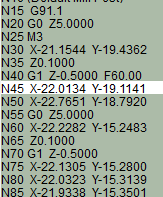 ISO code is primarily composed of G-code lines
More generally, ISO code, composed of G commands (as well as M, F, and S commands, etc.), allows you to tell computer-controlled machines, such as milling machines, what to do and how to do it. G-code commands are instructions indicating where to move, at what speed, and along which path, primarily using two methods: linear or circular.
Controlling your CNC machine with Mach3
Mach3 is part of the MACH software series, developed by Artsoft. It allows a computer to be transformed “into a control console” to operate your CNC machine. Mach3 is the most well-known software in its market. You can also directly import your files in DXF, BMP, JPG, and HPGL formats via the software’s LazyCam package, which is used to convert your part into a toolpath for Mach3.
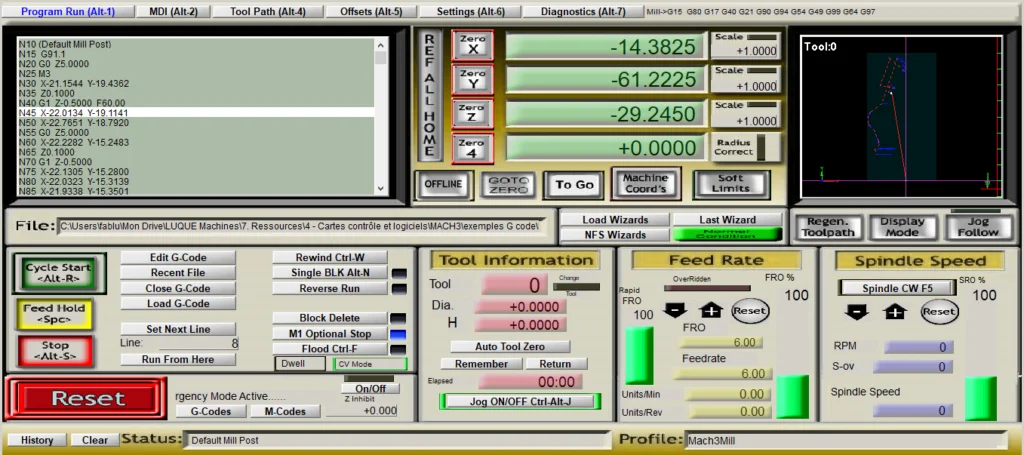 The Mach3 interface is fully customizable
You can create a fully customizable interface, in addition to being able to create M-codes and macros using VBScript. MACH3 software also features spindle speed control, multiple relay control, video display, manual pulse generation, with full-screen capability and touch buttons. This software is feature-rich and offers great value depending on the needs of your numerical control software package.
 Mach3 transforms your PC into a numerical control console
MACH3 runs on most Windows PCs to control motor movement step-by-step using G-Code. The required PC performance is not very demanding, and it can run smoothly on an office computer. Pentium, Dual Core, or Core 2 Duo microprocessors are sufficient to run this software. The installation of MACH3 is simple and can operate in “demonstration mode” for testing until it is unlocked by a license file that we offer on our site.
In short, this software aims to bring the functionality of a control console to a computer at a lower cost. But can it replace a numerical control system on a milling machine?